
Tokens (Yoti Key)

AI Tools

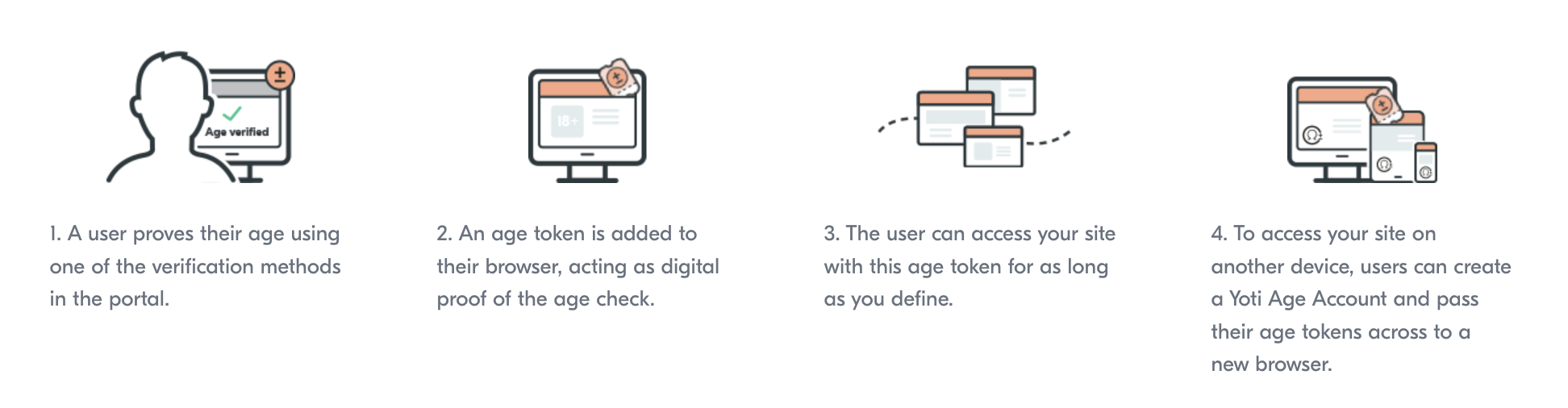
When a user visits a restricted content website, they’re sent to the Age Verification Service to verify their age. Yoti identifies the content provider, the age requirement, and any criteria specified for the verification. With this information, Yoti create a credential subject that contains the age token and a credential proof that contains a digital signature that proves the credential was issued by Yoti.
Age token

Age token

When the user lands on your site there will be a token request, a check is performed to see if the user has an age claim that matches your requirements.

If a user doesn’t have a token that meets the requirements, they’ll be sent to your age portal to prove their age again.

If a user doesn’t have a token that meets your requirements, they’ll be sent through the age verification process to prove their age again. You will need to add rules to your configuration e.g.

  • The maximum time that a token can be considered valid.
  • The method of age verification used.
  • The type of age recorded (an “Over/Under Age” or date of birth)
  • The age threshold a user must fall within.
  • The type of liveness check performed.
  • The type of authenticity check performed.

There are two steps that need to take place in order to use age tokens:

  • Create age token rule
  • Configure yoti_keys method

Create a rule

This step details how to create a rule id. The rule id may be passed directly to the create session payload and only needs to be generated once per rule configuration.

By creating an age token rule, you define the exact Age Verification requirements the user should meet from an existing flow.

HTTP
Copy
HeaderDescription
AuthorizationAPI Key to call the Yoti Age API. This must be sent as a Bearer token
Yoti-Sdk-IdYour unique Yoti-Sdk-Id (UUID)

The rule body is a mirror of the payload to Create an AV session. The rule is granular and will only be fulfilled if the AV method, threshold and anti spoofing levels are all met.

Hint It's advised to match your Age Token rule to your create session payload to ensure the user has met your own requirements.

JSON
Copy

The returned Rule ID must be retained as it will be used for all future checks.

Responses

Success
Copy
Error
Copy

Yoti Key Method

Yoti Keys represent Yoti’s version of a passkey - a secure, user friendly method for accessing websites and apps. Designed to replace traditional username and password authentication, passkeys use biometric data to ensure a seamless and secure login experience for users.

A passkey is made of two parts which are cryptographically linked - a private key (stays in your passkey vault) and a public key (stored on a website). Neither key is useful without the other so this adds an extra layer of security should a data breach occur.

Yoti Keys is a reusable age verification solution that only contains information on the initial age check, such as the age method used and the time the age token was created.

Each Yoti Key stores only non-personalised age verification data (like method and timestamp), making it privacy-first and regulation friendly.

Key Benefits:

  • Reduce friction for returning users
  • Protect privacy and anonymity
  • Flexible and customisable to meet global regulatory requirements (each website defines their own criteria for accepting a Yoti Key, in line with their regulatory requirements)
  • Enhance trust and safety
  • Privacy-first approach
  • Only need to integrate with one Yoti AVS method to use Yoti Keys
  • Can be used across linked devices

You willl need to generate a rule ID which is explained in the Tokens section.

Now that a rule id has been generated, it can be used in the session creation configuration to understand what conditions the age token needs to satisfy. You will also need to configure the yoti_key method, to enable the age token functionality.

JSON
Copy
FieldTypesDescription
allowedtrue / falseEnable the verification method to be available for the user to use.
authenticationtrue / false

False: When the Yoti user interface is launched we immediately check if the user has a token that matches the requirements set in the rule. If it matches, the user is immediately directed to the callback url.

True: When users finish any of the Yoti age verification methods, they have the option to create a passkey. They can then use this yoti key to quickly pass any future age verification sessions that they need to undergo. If authentication is set to true, The Yoti user interface will be shown, the user can then select the yoti_key method to verify their age, or they can use another method in the UI.

Embedding the Yoti UI in an iframe and setting authentication to false will not work as intended, since users must be redirected to the Yoti domain. Therefore, we do not recommend using an iframe. Additionally, Yoti keys are not supported in the Firefox browser.

Type to search, ESC to discard